
Hardening Your Online Presence
TLDR: In this guide I walk through how I approach personal OpSec as an everyday mindset, not tinfoil hat paranoia. I explain how I map out what really matters about my identity, access, behavior, and content, how de anonymization actually works in the real world, and how I separate different personas so one slip does not expose my entire life. I cover practical habits and tools for passwords, devices, browsing, communication, email aliases, and social media, along with new trends like fingerprinting, data brokers, and AI driven OSINT, so that my online footprint is harder to connect to my real self and any eventual leak hurts less.
Introduction
You cannot rely on companies to protect your data, so it is on you to protect yourself. That is what Operational Security (OpSec) is about in a personal context: a mindset focused on limiting how much of your real life can be reconstructed from your online trail.
For me, personal OpSec lives at the intersection of:
- Identity: your real name, face, voice, phone, address
- Access: your accounts, passwords, tokens, devices
- Behavior: what you do, when you do it, and from where
- Content: what you say, post, share, and store
This guide walks through how I think about OpSec day to day, the ways people get de-anonymized in practice, and realistic steps to shrink your online footprint without needing to disappear entirely.
I am not talking about avoiding law enforcement while doing crimes. I am talking about avoiding stalkers, doxxers, sketchy data brokers, lazy investigators, and random people who should not be able to pull your life story from three old posts and a leaked email.
My baseline rule is simple: no face, no case. The less that directly ties back to your real identity, the less damage anyone can do.
Why Do I Care?
 Click to zoom
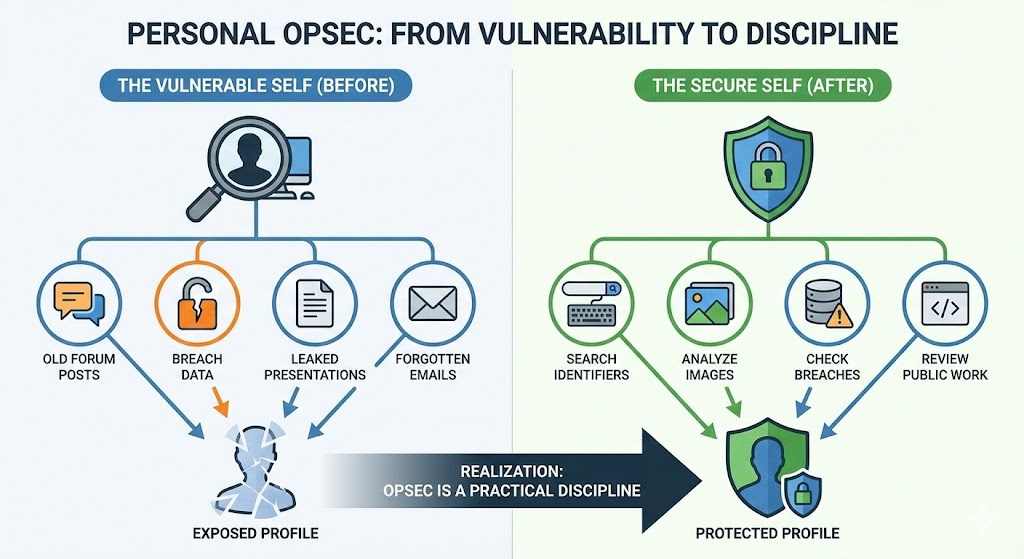
What pushed me into OpSec was not theory. It was ego death via self search.
A few years ago I typed my own name and old usernames into search engines and breach checkers. What I found:
- Old forum posts under dumb teenage usernames
- Credentials in public breach dumps
- Personal presentations that leaked which sites and tools I used
- Email addresses linked to services I had forgotten existed
Individually, none of these were catastrophic. Together, they formed a decent profile of who I was, what I did, and where to poke if someone wanted to mess with me.
If you have never done this, here is a quick exercise that usually wakes people up:
- Search your full name, common handles, old gamertags, and email addresses.
- Look at image search results. Do they show your face, your house, your car, or your friends and family.
- Check if your emails show up in public breach databases.
- Look at any public presentations, GitHub repos, or portfolios you have. Do they leak workplace, city, or schedule details.
Once you see how much of your life leaks out through laziness, you start to appreciate OpSec as a practical discipline, not paranoia.
Core Principles of OpSec
 Click to zoom
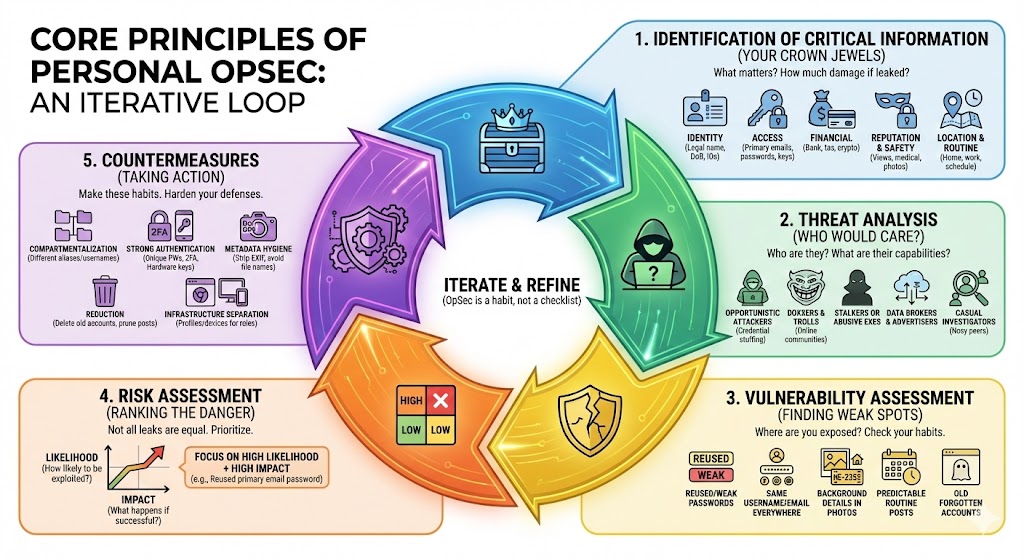
OpSec is not a one time checklist. It is an iterative loop you run in your head when you sign up for something, post something, or connect a new device.
Here is how I translate the classic 5 step OpSec process into personal use.
1. Identification of Critical Information
First, you need to know what actually matters. For most people, critical information falls into a few buckets:
-
Identity Legal name, date of birth, face, voice, government IDs, personal phone number, home and work addresses.
-
Access Primary email accounts, password manager vault, recovery codes, SIM and phone number, hardware security keys, SSH keys.
-
Financial Bank and card details, tax info, crypto keys, PayPal and payment accounts.
-
Reputation and safety Political views, kinks, medical information, compromising photos, anything that could be used for blackmail or harassment.
-
Location and routine Home location, workplace, common commute, gym or cafe spots, travel habits and time zones.
You can treat these as your "crown jewels". Any time one of them leaks, ask yourself: how much damage could someone do with this, combined with everything else that is already out there.
2. Threat Analysis
Next, ask the uncomfortable question: who would actually care enough to come after you.
Examples for normal people:
- Opportunistic attackers running credential stuffing against reused logins
- Doxxers or trolls from online communities you are active in
- Stalkers or abusive exes
- Data brokers and advertisers trying to profile you at scale
- Casual investigators (nosy coworkers, neighbors, future employers)
Each group has different capabilities. Data brokers will lean on large data sources, browser fingerprinting, and device level tracking. Stalkers are more likely to scrape your social media, read public posts, and correlate photos and schedules. Attackers might go straight for your primary email and password reuse.
Your goal is not to fear all of them. It is to know which ones are realistic for you and in what direction to harden.
3. Vulnerability Assessment
Now you connect your critical info and threats to your actual weak spots.
Common personal vulnerabilities:
- Reused or weak passwords across services
- Same username everywhere, including on sensitive accounts
- Same email for banking, personal life, and throwaway signups
- Photos that show house numbers, license plates, or work badges in the background
- Public calendars or posts that show a predictable routine
- Old websites you forgot you had accounts on, still tied to your main email
- Logging in from the same browser profile for work, personal, and anonymous personas
Do a quick pass:
- Take 3 accounts you truly care about (primary email, main social network, bank) and inspect their security.
- Pick 3 public places where you post (social, forums, GitHub, etc) and see what an outsider can infer from just your public content.
You will find more holes than you expect.
4. Risk Assessment
Not all leaks are equal. A random hobby forum post from 2012 is not in the same class as a leaked password for your primary email.
For each vulnerability, roughly rank:
-
Likelihood How likely is it that someone will try to exploit this.
-
Impact What happens if they succeed. Account takeover, stalking, blackmail, embarrassment, or nothing much.
High likelihood + high impact should get your attention first. Example: old reused password that still works on your primary email is high risk, fix that now. An old blog that mentions a city you once lived in is low risk.
This is what keeps OpSec from turning into pure paranoia. You do not need to fix everything immediately, just the parts that are easy to exploit and would hurt the most.
5. Countermeasures
Once you know what matters, who might care, and where you are weak, you decide what to change.
Practical countermeasures I like:
-
Compartmentalization Different email aliases and usernames for different roles in your life. No single alias should let someone map your entire world.
-
Strong authentication Password manager plus unique strong passwords, plus 2FA on anything that matters. Prefer app or hardware key 2FA over SMS where you can.
-
Metadata hygiene Strip EXIF data from photos before posting, especially GPS and device info. Avoid exposing original file names that leak devices or projects.
-
Reduction Do not keep what you do not need. Delete old accounts, prune old posts, and avoid storing sensitive data with third parties unless it is crucial.
-
Infrastructure separation Different browser profiles or even different devices for work, personal, and anonymous use. Do not log all personas into the same Google or Apple account.
OpSec is mostly about making these decisions habit, not one time projects.
De-Anonymization and How It Works
 Click to zoom
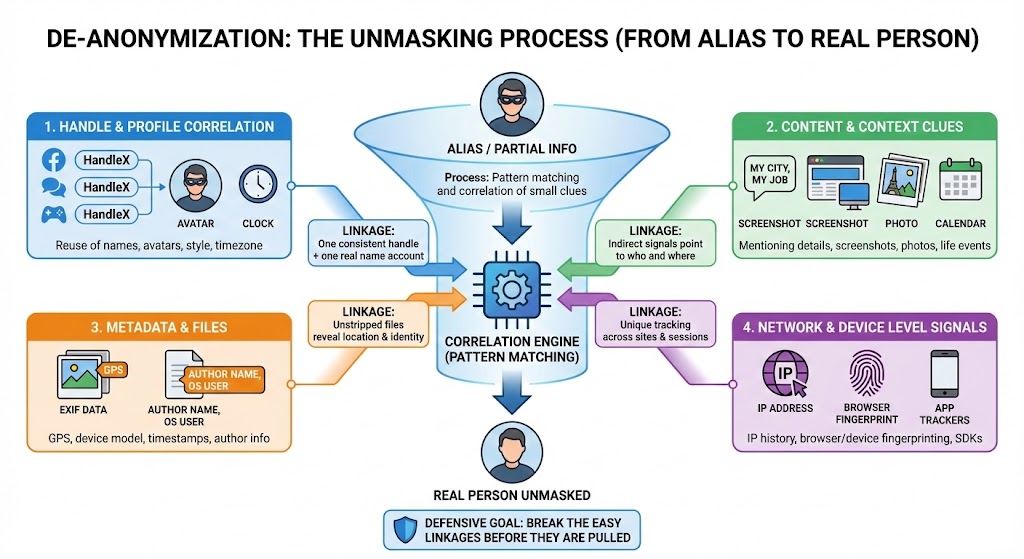
De-anonymization is the process of starting from an alias or partial information and working backward until it links to a real person. It is not magic. It is pattern matching and correlation across a lot of small clues.
Some of the common angles:
1. Handle and profile correlation
Most people reuse something:
- The same username or variants across sites
- The same avatar or banner image
- The same writing style and phrases
- The same timezone and posting hours
Tools that search usernames across platforms or scrape profile pictures make this very efficient. One consistent handle plus a single account with a real name is often enough to link the rest.
2. Content and context clues
What you talk about and how you talk about it leaks information.
Examples:
- Mentioning your city, employer, school, niche industry, or job title
- Posting screenshots that show tabs, bookmarks, desktop backgrounds, or internal tools
- Photos with landmarks, street signs, or building interiors
- Talking about events in your life on specific dates that can be cross referenced with public info
Even if you never say "I live at X", enough indirect signals will eventually point roughly to who and where you are.
3. Metadata and files
Files usually carry more than you think:
- Photo EXIF tags containing GPS coordinates, device model, and timestamps
- Document metadata with author name, company, or OS user name
- Cloud share links that leak email addresses or internal folder names
One unstripped photo can reveal more than hundreds of careful text posts.
4. Network and device level signals
At a lower level, your traffic and device leak data even when you think you are "private":
- IP address history at services you log into
- Browser and device fingerprinting (fonts, plugins, OS, screen size, GPU, etc) that can uniquely identify you across sites, even when cookies are blocked
- Cross app trackers in mobile SDKs
Research has shown that browser fingerprinting is widely used in the wild to track users across sessions and sites without cookies, and that a browser fingerprint can often be unique enough to reliably identify you.
You cannot control all of this, but you can reduce how much you leak and how linkable it is.
The whole point of learning how de-anonymization works is defensive. You want to break the easy linkages before someone with time and motivation decides to pull on those threads.
My Approach: OpSec Through Obscurity
The heart of personal OpSec, for me, is obscurity over invincibility. I am not trying to win against a nation state. I am trying to be annoying to investigate.
That means:
- Make it hard to reliably link my real identity to my online aliases
- Make it hard to map all my aliases to each other
- Make it easy for me to maintain, and painful for an attacker to follow
Separation of identities
I treat identities as separate "personas":
-
Legal persona Government, banking, health care, tax, close family. Uses my real name, main phone, and a single primary email.
-
Public but non sensitive persona Things like professional accounts, portfolio, public GitHub, or blog. Still uses real identity but is hardened.
-
Pseudonymous persona(s) Handles and accounts that are not linked to my real name or phone. Used for communities where I do not want my legal identity involved.
-
Short lived or burner personas Temporary accounts for testing, trials, or higher risk activity. Assumed disposable.
Rules I follow:
- Never log a pseudonymous persona into an app or service that is tied to my real identity.
- Avoid crossing payment methods. Real bank cards go only with real name or public persona, not anonymous aliases.
- If an alias gets widely exposed or contaminated with real life info, treat it as burned and retire it slowly.
"No face, no case" with context
I still like the rule, but I apply it with nuance.
- I avoid posting clear, linkable photos of my face under aliases.
- If I must, I assume that face is now connected to that handle forever, and behave accordingly.
- I keep family, kids, and close friends off any public channels as much as possible.
It is not about being ashamed. It is about minimizing how easily someone can connect an online handle to a real person with a physical address.
Network level obscurity: Tor, VPNs, and multi hop
Network privacy is its own rabbit hole. My personal philosophy:
- A single reputable VPN is usually enough for most people who just want to avoid ISP level profiling and some geo restrictions.
- For higher risk situations, you can use multi hop setups (VPN to VPN, or VPN into Tor) to reduce reliance on any one provider seeing both ends of your traffic.
- If you use Tor, understand that it trades speed and usability for anonymity, and it can still be deanonymized with enough resources and mistakes.
The important point is this: these tools do not override bad OpSec. If you log into your real Google account over Tor from the same device you use for everything else, you did not gain much. Network tools are support, not a replacement for identity and behavior discipline.
Tools and Best Practices
Tools are useless if your habits are careless. I try to line things up in this order: habits first, then tools.
Identity and authentication
- Use a password manager (Bitwarden, 1Password, KeePass variants, etc) for all credentials.
- Generate unique, long passwords. Anything important should never be reused, ever.
- Turn on 2FA everywhere it is offered. Prefer TOTP apps or hardware keys over SMS.
- Protect your primary email like your life depends on it. If someone owns that, they can reset almost everything else.
Devices and operating systems
- Turn on full disk encryption on all laptops and phones. Modern OSs have this built in, just make sure it is actually enabled.
- Keep auto updates on for OS and browsers. Patching is boring but it closes a lot of low effort attacks.
- Use a lock screen with a strong PIN or password, not a 4 digit code that everyone around you can shoulder surf.
- Consider separate user accounts or even separate devices for different personas if your risk profile justifies it.
Browsing and tracking
- Run at least one browser profile that is kept clean of logins to big trackers (Google, Facebook, etc). Use it for "anonymous" browsing.
- Use built in tracking protection features. Browsers like Firefox and Brave ship with stronger protections against third party trackers and fingerprinting, and some are actively adding defenses that reduce how uniquely you can be identified based on hardware and browser characteristics.
- For high risk research or activity, use Tor Browser and accept that some sites will break.
- Regularly clear site data and cookies on profiles you use for more sensitive activity.
Even with these, browser fingerprinting can still track you across sites in many cases, but you make yourself less uniquely identifiable and therefore less of an easy target.
Communications
- Prefer end to end encrypted messengers by default. Signal is a strong choice, and it has already rolled out post quantum safe upgrades behind the scenes to protect against future "harvest now, decrypt later" attacks.
- Use disappearing messages where appropriate, but do not rely on them as magic. Screenshots exist.
- Keep sensitive conversations off platforms that log and monetize content by design (open DMs on ad funded networks, for example).
Email, aliases, and signups
- Use email aliasing services (SimpleLogin, AnonAddy, browser based relay services) to create per site addresses that all forward into a central inbox.
- Use a small number of "root" inboxes and lots of aliases that you can kill or filter if they leak or get spammed.
- Keep a strict separation between your legal identity email, your public persona email, and your anonymous aliases.
Social media and content
- Go through your main social accounts and lock down privacy settings. Limit who can see old posts and your friends list.
- Scrub or archive posts that reveal too much about your location, workplace, routine, or family.
- Before posting a photo, check the background for badges, street names, reflections, or screens that leak information.
Network hygiene
- Use a VPN as a default when on untrusted networks like public Wi-Fi.
- Avoid mixing guest devices, work laptops, and random IoT gear on the same flat home network if you can.
- Change default passwords on routers and smart devices, or do not put them online at all.
None of these are exotic. They are just layers that make exploitation harder.
Emerging Trends in OpSec
The privacy landscape is shifting under our feet. A few trends I pay attention to:
1. Browser fingerprinting and anti tracking arms race
Tracking is moving from obvious cookies to more stealthy techniques like device and browser fingerprinting. Researchers and regulators are increasingly calling this out as a serious privacy risk, and browsers are starting to respond with built in protections that randomize or standardize certain signals.
For personal OpSec, that means:
- You cannot rely only on clearing cookies or using incognito mode.
- You should assume that some level of cross site profiling is happening unless you are using very hardened setups.
2. Post quantum crypto reaching consumers
Post quantum cryptography used to be an academic topic. Now, consumer apps like Signal are shipping hybrid protocols designed to stay secure even if powerful quantum computers arrive later.
You do not need to understand the math, but you do want to pay attention to which services are planning for the long term and which still treat encryption as a marketing checkbox.
3. Data broker and ad tech pressure
Regulators are slowly waking up to how invasive some tracking practices are, especially around fingerprinting and cross device tracking. There is pushback, but ad tech will not vanish. It will adapt.
For OpSec, it is safer to assume that:
- Anything you give to a free service may be shared, sold, or leaked.
- Opt out links reduce but do not erase your exposure.
4. AI assisted OSINT
Open source intelligence used to require a lot of manual work. AI tools now make it easier to:
- Cluster writing styles and identify the same person across aliases
- Analyze large volumes of posts, images, and video for patterns
- Enhance low quality images and audio
This raises the bar on what "enough obscurity" means. The answer is not to panic. It is to double down on the basics: reduce signals, avoid reuse, and separate identities.
Conclusion
You do not fix OpSec in one weekend. You build it into how you use the internet.
If you want a concrete starting point:
- Lock down your primary email and banking accounts with strong passwords and 2FA.
- Move all your passwords into a manager and kill any reuse.
- Introduce email aliases so future leaks are compartmentalized.
- Create a clean browser profile or device for pseudonymous activity and keep it segregated.
- Audit your public content and remove or lock down anything that leaks more than you are comfortable with.
From there, keep iterating. Each time you sign up for something new or post something public, run the mental loop: what am I revealing, what could this connect to, and is the tradeoff worth it.
No face, no case is a good rule of thumb, but the real win is this: nothing online should be able to hurt you more than you are willing to accept.
Related posts
Bepo: My Homelab Setup
A look at my homelab setup: server specs, network configuration, storage strategy, virtualization with KVM/libvirt, and extensive suite of self-hosted services.
Evolution of Malware Evasion
A comprehensive analysis of how malware evasion techniques have evolved over the past decade, revealing patterns in attacker behavior, defender responses, and the accelerating arms race in cybersecurity.
Ubiquiti Everything!
Making my home network more secure and performant with Ubiquiti